

The Shift from Push-Based to Pull-Based File Sharing: Why You Should Stop "Sending" Files
Why push-based file sharing is broken. Discover how pull-based sharing and local HTTP streaming turn 1-to-1 bottlenecks into 1-to-N on-demand buffet where you stream before downloading.
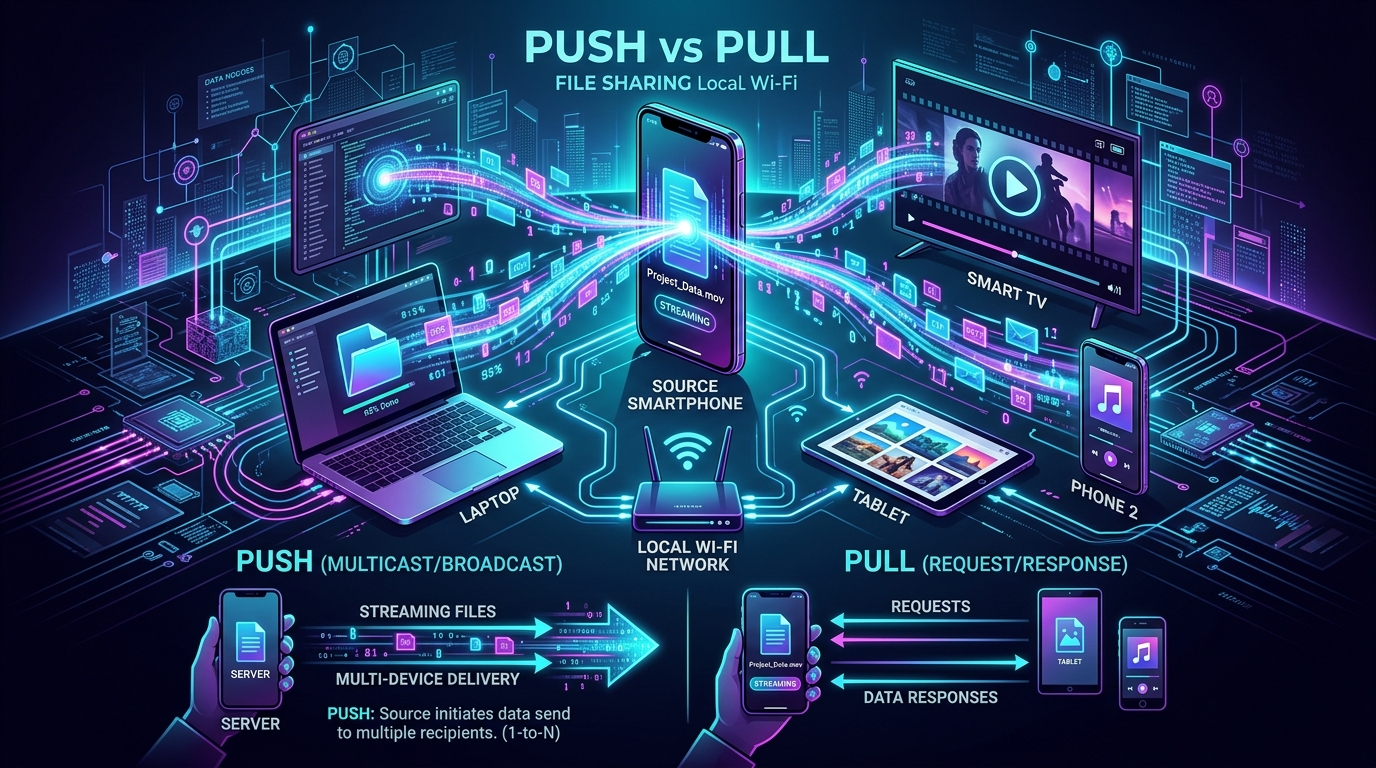
The Shift from Push-Based to Pull-Based File Sharing: Why You Should Stop "Sending" Files
The 30-Second Truth: Traditional file sharing forces the sender to actively push files 1-to-1, holding both devices hostage until the transfer finishes. Pull-based file sharing inverts this broken model: the host shares a folder once, and multiple receivers pull or stream only the exact files they need directly inside any web browser. No receiver apps, no wasted storage, no battery drain, and full control for both parties.
The Hostage Situation: Why Sharing Files in 2026 Still Feels Broken
Picture this scene. You're at a gathering, vacation trip, or team meeting. You just recorded a 15GB 4K video of a keynote or family celebration. Three people around you say: "Can you send me that?"
What happens next is an awkward, frustrating ritual that hasn't changed since Bluetooth in 2004:
- The Sender Is Paralyzed: You open your file sharing app or AirDrop. You select the 15GB video. "Don't turn off your screen!" you warn everyone. Your phone heats up like a pocket toaster, battery percentage plummets by 12%, and you can't switch to WhatsApp or reply to a text because the transfer will cancel.
- The 1-to-1 Sequential Bottleneck: Person #1 gets the file after 3 minutes. Now you have to repeat the entire transfer ritual for Person #2. Then again for Person #3. You have just spent 10 minutes pushing the exact same gigabytes across the room three separate times.
- The Receiver's Panic (Storage Anxiety): Meanwhile, Person #2's phone flashes: "Storage Full: Cannot accept transfer." They scramble to delete old photos and apps while you wait.
- The Blind Download Trap: When Person #3 finally finishes downloading, they open the video and realize: "Wait... this is the 12-minute unedited raw clip where the camera was pointed at your shoes. I only wanted the 30-second speech." 15GB of storage and 5 minutes of time completely wasted.
This isn't a problem with your Wi-Fi chip or smartphone hardware.
This is a fundamental failure of the Push-Based architectural model.
Push vs. Pull Architecture: Understanding the Paradigm Shift
Every mainstream file sharing tool you've ever used—AirDrop, Quick Share, Nearby Share, LocalSend, WhatsApp, Telegram, or classic Bluetooth—relies on Push Architecture.
Here is what that looks like under the hood:
1. The Push-Based Model (Active Sender, Passive Receiver)
- Pushes entire 15GB payload blindly
- Screen locked awake at 100% brightness
- Phone overheats, battery drops 12%+
- Cannot multitask or leave transfer app
- Cannot preview or inspect before downloading
- Entire 15GB forced onto local disk
- "Storage Full" errors abort transfer midway
- Wrong video discovered only after download
In a push model:
- Sender initiates everything: The sender dictates what files are transmitted.
- Blind reception: The receiver cannot inspect, search, or preview before accepting.
- Synchronous lock: Both sender and receiver must keep their screens on, apps foregrounded, and radios pinned until the last byte arrives.
- Strictly 1-to-1: Transmitting to 3 people consumes 3x bandwidth and 3x sender battery.
2. The Pull-Based Model (Decentralized Local Server, On-Demand Streaming)
Now observe what happens when you invert the equation to Pull Architecture using an offline local server like WiFiOTT:
/Vacation2026- Browses thumbnail gallery
- Pulls only 1 photo of interest
- Zero wasted phone storage
- No iOS app installed
- High-speed 50–80 MB/s direct pull
- Downloads raw 4K clip to desktop
- Admin Mode: upload files back
- No desktop software needed
- Streams 4K video instantly
- HTTP 206 seek & sub-second start
- Zero TV disk space consumed
- No sideloading or dongles
In a pull model:
- Sender becomes a passive host: You select the folder or files you want to share and tap Start Sharing. Your phone becomes a lightning-fast local HTTP server. You lock your screen and put the phone in your pocket.
- 1-to-N concurrent access: One friend, five friends, or ten colleagues can connect at the same time over local Wi-Fi or your personal mobile hotspot.
- Receivers pull on-demand: Receivers open any web browser (Safari, Chrome, Edge, Firefox, or Smart TV browser). They see clean thumbnails, search files, read documents, or stream 4K video instantly.
- Zero receiver app installation: Nobody has to download an app from Google Play or the App Store. No pairing codes, no account creation, no cloud relays.
- Stream before download: Receivers can watch a 2-hour movie or 4K video instantly. If they only wanted to watch it, zero bytes of permanent phone storage are consumed. If they want to keep it, they hit "Download".
Detailed Comparison: Push vs. Pull File Sharing
| Feature / Dimension | Traditional Push Sharing (AirDrop, LocalSend, Quick Share) | Modern Pull Sharing (WiFiOTT Local OTT Server) |
|---|---|---|
| Architectural Model | 1-to-1 Point-to-Point Push | 1-to-N Local Request/Response Server |
| Sender Burden | Must actively select, negotiate, and keep app open | Select folder once, lock screen, host in background |
| Receiver Requirements | Must have identical app or compatible OS installed | Any web browser (Safari, Chrome, Edge, TV) |
| Group Sharing (4+ People) | 4 separate sequential transfers (4x battery drain) | Simultaneous multi-device access over local Wi-Fi |
| Content Inspection | ❌ None (Receiver accepts blindly) | ✅ Full thumbnail previews, audio/video scrubbing |
| Streaming Capability | ❌ No (Must wait 100% download to watch) | ✅ Instant HTTP Range 4K playback with zero lag |
| Local Disk Waste | High (Entire file forced onto receiver storage) | Zero (Stream on-the-fly; download only if desired) |
| Cross-Platform Bridge | Clunky across Android, iOS, Windows, Mac, and TVs | 100% Universal (Works on any device with a browser) |
| Sender Privacy Control | Pushes specific files per transaction | Granular folder selection + Read-Only vs Admin toggle |
The "Stream-Before-You-Download" Superpower
The single biggest breakthrough of pull-based sharing is instant media streaming via HTTP 206 Partial Content (Range Requests).
When someone pushes an 8GB .mkv or .mp4 video to your phone over traditional transfer tools:
- You must wait 4 to 8 minutes for the transfer bar to reach 100%.
- Your phone must have 8GB of free internal flash storage.
- If the transfer drops at 99%, the entire file corrupts and you start over.
- You cannot jump to the middle of the video until it finishes downloading.
How WiFiOTT Pull Streaming Changes the Game
When your friend hosts media with WiFiOTT:
- Instant Seek: You tap play on your iPhone or laptop browser. The player requests only the first 2MB chunk to start playback within 200 milliseconds.
- Hardware Acceleration: Native HTML5 video engines decode the stream directly with zero transcoding delay.
- Jump Anywhere: Drag the seek bar to minute 45:20. The browser requests byte range
bytes=4250000000-4260000000directly from the host phone. It plays instantly without downloading the previous 45 minutes! - Subtitle Auto-Loading: Subtitle tracks (
.srt,.vtt) in the shared folder appear automatically on your screen.
GET /video.mp4 (Range: bytes=0-1048576) → Host returns first 1MB chunk in 200ms. Movie starts playing immediately!Range: bytes=3500M-3502M → Plays immediately without waiting or downloading the prior 3.5GB!You get the exact same experience as Netflix or YouTube, but running 100% offline at 300–800 Mbps over direct local Wi-Fi with zero internet required.
Real-World Scenarios Where Pull-Based Sharing Wins
Scenario 1: The Road Trip or Vacation Video Hub
You’re in an RV or mountain cabin with no cellular reception or internet. You have 50GB of movies and series on your Android phone.
- Push way: Sit with each friend, Bluetooth or AirDrop one movie at a time, filling up everyone's device storage.
- Pull way: Turn on your phone's personal hotspot (keep mobile data OFF). Open WiFiOTT and start sharing your Movies folder. Friend A watches a comedy on their iPad; Friend B watches an action film on their laptop; Friend C streams a documentary on the cabin’s Samsung Smart TV browser. All three stream concurrently from your single phone.
Scenario 2: Distributing Meeting Assets or Event Photos
You just took 400 photos at a wedding or team offsite.
- Push way: Create a Google Drive or Dropbox link (eating your cloud quota and mobile data), or push 3GB zip files to individual laptops.
- Pull way: Start WiFiOTT. Put the generated QR code on the meeting projector or table. Everyone scans with their default camera app, browses the high-resolution photo gallery, and downloads only the 5 pictures they actually appear in.
Scenario 3: Cleaning Out Phone Storage to a PC
You want to back up 40GB of camera footage from your Android to your Windows PC or Mac.
- Push way: Hunt for an elusive USB cable that constantly disconnects when bumped, or deal with buggy desktop companion apps.
- Pull way: Open WiFiOTT in Admin Mode. Type the address into your PC browser. You can not only download entire folders as high-speed ZIPs at 50MB/s, but you can also upload files back to the phone or delete unwanted clips directly from your desktop monitor.
How to Set Up Pull-Based File Sharing in 30 Seconds
Getting started requires zero technical knowledge and zero network configuration:
Step 1: Open WiFiOTT on the Host Android Device
- Install the free WiFiOTT App from Google Play.
- Tap Select Folders and choose the folders or media files you want to make accessible.
- Toggle between Read-Only (guests can only view/stream/download) or Admin Mode (allows two-way uploads and file management).
- Tap Start Sharing. WiFiOTT spins up an ultra-fast local server and displays a local URL (e.g.,
http://192.168.1.45:8080) and a QR code.
Step 2: Connect Receivers (Zero App Installation)
- Ensure receiver devices are on the same local Wi-Fi (or connected to the host phone's portable hotspot).
- On any iPhone, iPad, Mac, Windows laptop, or Smart TV, open any browser and type the URL or simply scan the QR code.
- The clean WiFiOTT web console loads instantly.
Step 3: Stream, Browse, and Pull
- Tap any video to stream with native hardware acceleration.
- Tap any audio file to listen to music playlists.
- Click Download on any specific file or folder when you want to store a permanent local copy.
- Turn off your host phone screen—WiFiOTT runs seamlessly in the background with battery optimization safeguards.
Frequently Asked Questions (FAQ)
Does pull-based sharing consume my cellular mobile data?
No. All communication happens strictly over local Wi-Fi or your phone’s Wi-Fi hotspot. You can turn off Mobile Data entirely in your Android settings, and WiFiOTT will continue streaming and transferring files at maximum local network speeds (often exceeding 40–80 MB/s on 5GHz Wi-Fi).
Can receivers see my private photos or messages?
Never. Unlike screen mirroring or crude FTP servers that expose your whole internal storage, WiFiOTT utilizes strict Selective Folder Sandboxing. Receivers can only see and access the exact folders you explicitly choose to share. Your private photos, WhatsApp chats, and sensitive documents remain completely invisible and protected.
Do receivers need to install an app?
No. That is the core beauty of pull-based sharing. Any device equipped with a modern web browser (Apple Safari, Google Chrome, Microsoft Edge, Mozilla Firefox, Samsung Internet, LG WebOS Browser, Amazon Silk) can browse, stream, and download files with zero software installation.
How many devices can stream or pull files at the same time?
Because WiFiOTT's embedded HTTP engine is optimized for high concurrency and asynchronous I/O, a single modern Android phone can easily serve 4 to 8 simultaneous client streams over a 5GHz Wi-Fi network without frame drops or buffering.
Stop Pushing. Start Hosting.
Push-based file sharing was built for an era of 3-megabyte MP3s and single-recipient transfers. In an era of 4K 60fps HDR video, massive photo collections, and multi-device households, forcing a sender to push gigabytes blindly is obsolete.
By shifting to pull-based on-demand file sharing, you reclaim your time, save your battery, protect your storage, and give everyone on your local network the freedom to stream and download what they want, when they want.
Experience the future of local sharing today:
Download WiFiOTT Free on Google Play
Experience True On-Demand Pull Sharing with WiFiOTT
Stream movies to TV, share files with multiple devices simultaneously, and eliminate 1-to-1 transfer bottlenecks forever.
Experience Fast Offline Streaming with WifiOTT
Stream full HD movies and transfer files offline between any devices on your local Wi-Fi. Free and private.